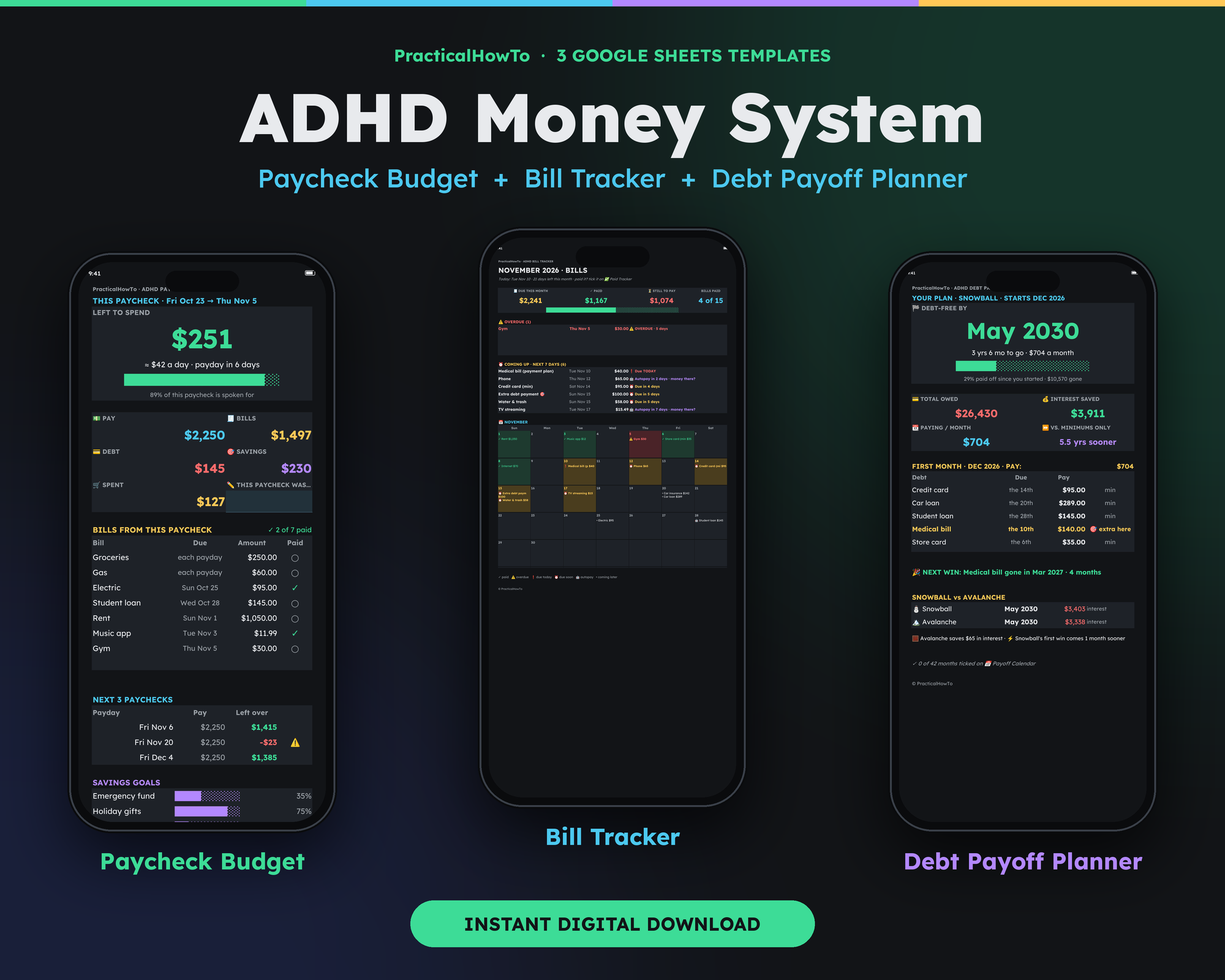
A budget built for the ADHD brain — planned around your actual paydays
Most budgets assume your money arrives in one neat monthly lump and your brain files due dates on its own. This one doesn't. Three Google Sheets answer the only three questions that matter: What can I spend this paycheck? Did I pay everything? When am I out of debt?
Instant download · Works in free Google Sheets · One-time payment — no subscription, no app to install
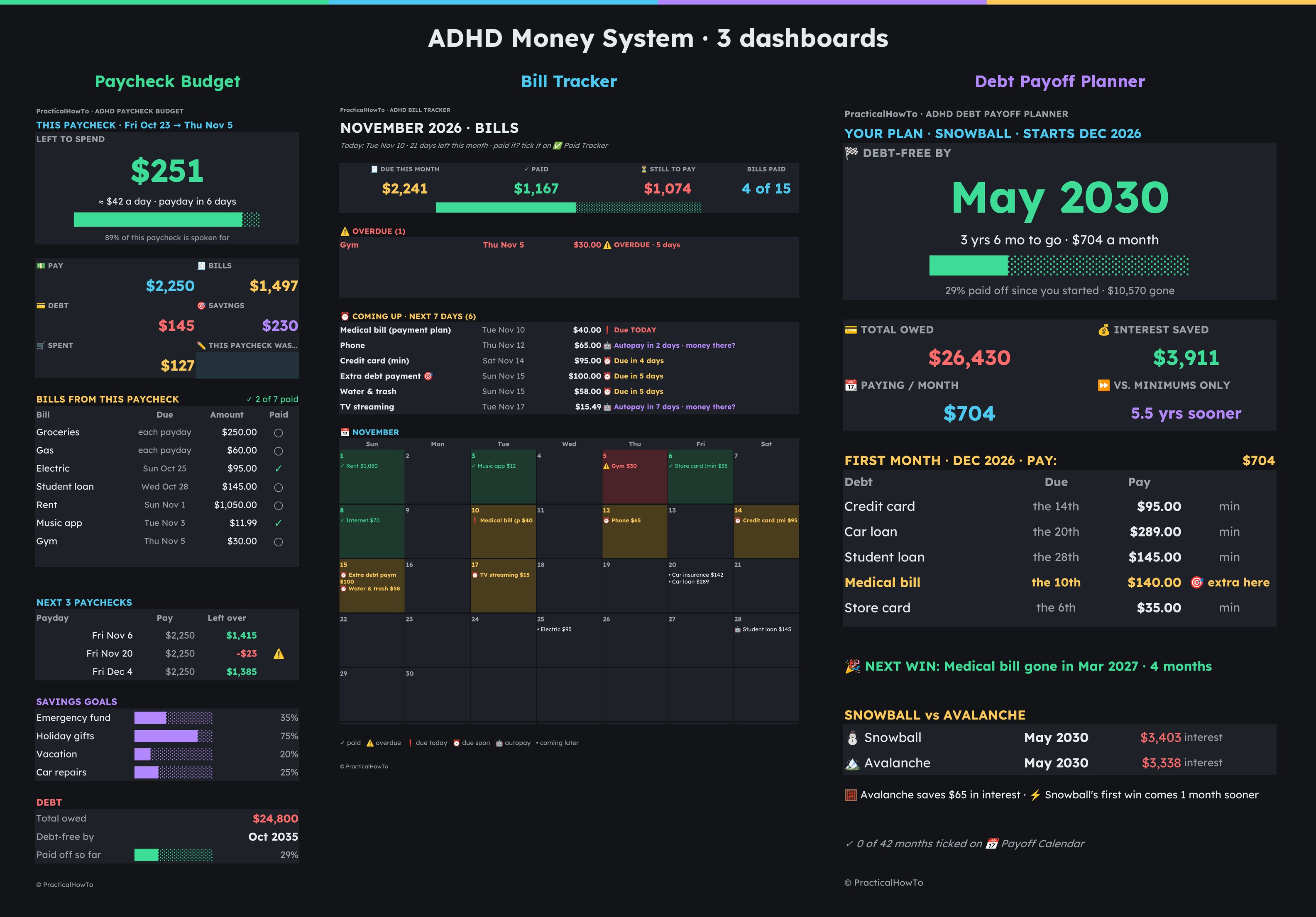
The three dashboards, exactly as they look — dark, big-numbered, one question per screen.
You know this feeling
None of these are discipline problems. They're what happens when a normal budget meets an ADHD brain.
The bill you swore you already paid
It was due Tuesday. You find out from the late fee — or from the autopay that hits an empty account.
Payday-rich, week-two broke
Friday's balance looked fine. By the next Thursday it's gone, and you honestly can't say where it went.
Debt that never seems to move
You pay every month. The balances barely change, there's no finish line in sight, so the whole thing feels pointless.
Why this one sticks
7 reasons this system fits an ADHD brain
Not a generic spreadsheet with “ADHD” in the title. Every piece below exists because of one of the three feelings above.
1
It plans by payday, not by month
A monthly budget pretends rent, the car payment, and groceries all land on the same day. Your money doesn't work like that. The Paycheck Budget splits your bills across your actual paychecks — weekly, biweekly, twice-monthly, or monthly — and gives you one big number: what's left to spend, and about how much that is per day.
It also previews your next 3 paychecks, so a tight one shows up weeks early as a warning instead of ambushing you as an overdraft.
This paycheck · Left to spend
$251
≈ $42 a day · payday in 6 days
89% of this paycheck is already spoken for — shown, not hidden
Pay$2,250Bills$1,497Next tight paycheck−$23 ⚠
Dashboard styling shown from the included example profile.
2
Every bill lives on one screen
No digging through email, apps, and paper statements to answer “what's due?” The Bill Tracker puts every bill on one screen with its due date and amount. Overdue and due-soon bills float to the top, autopay bills get a “money there?” flag, and a 12-month paid grid keeps your history — tick a bill when it's paid and it stays ticked.
It handles monthly, quarterly, twice-a-year, yearly, and one-time bills — up to 50 of them — so the weird ones stop being surprises.
⚠ Overdue (1)
Gym — due Thu Nov 5 5 days overdue$30.00
Coming up · next 7 days
Medical bill (payment plan) Due today$40.00
Phone Autopay in 2 days · money there?$65.00
Credit card (minimum) Due in 4 days$95.00
From the included exampleThe example profile has $2,241 due this month and $27,102 a year across all its bills — every dollar of it visible on one screen.
3
Debt payoff gets two finish lines
“Pay extra on your debts” is useless advice without a date. The Debt Payoff Planner runs your debts two ways — snowball (smallest balance first, quick wins) and avalanche (highest interest first, least interest paid) — and shows both finish lines side by side, with a “this month, pay:” list that tells you exactly what goes where.
Pick the plan your brain will actually stick to. Both beat drifting.
From the included exampleOn the example profile owing $26,430, the snowball plan reaches debt-free in May 2030 — about 5.5 years sooner than minimum payments only, which run to Nov 2035 — and saves $3,911 in interest. Your numbers will differ; the planner runs them the same way.
4
You copy a working system — not a blank sheet
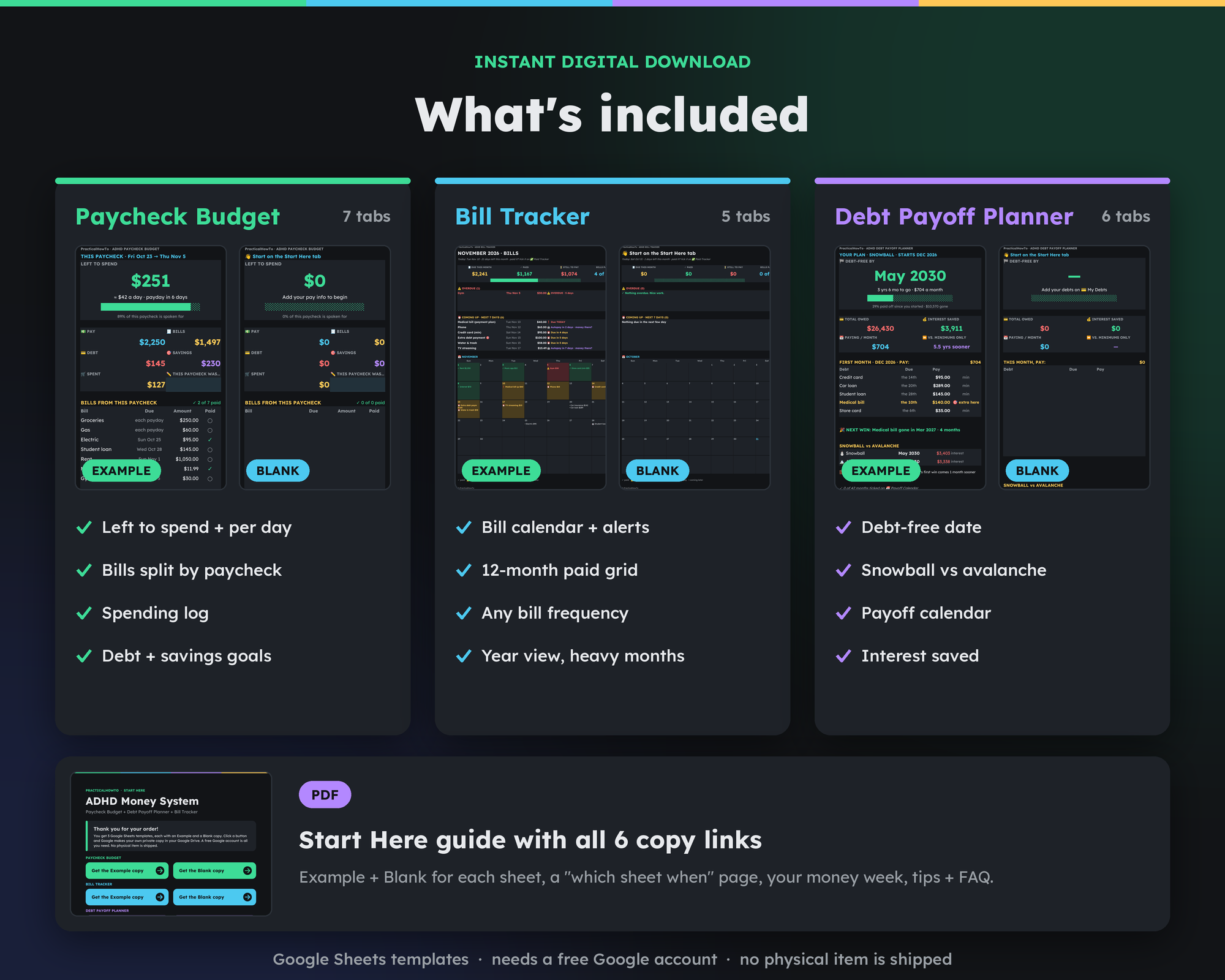
A blank template is homework, and homework is where ADHD systems go to die. Each of the three tools comes in two versions: an Example, pre-filled with a full sample profile so you can see exactly how everything works, and a Blank ready for your numbers.
The Start Here guide PDF holds all 6 copy links, the setup order, and a “which sheet when” page — so getting started is clicking, not figuring out.
5
Dark, low-glare, and easy to look at
A tool you avoid opening doesn't help. All three dashboards are dark-mode with big, color-coded numbers — green means fine, amber means look, red means act — set in Lexend, a typeface designed for easier reading.
And there's exactly one rule to learn: blue cells = type here. Everything else fills in by itself.
$251Left to spend — you're fine
Due soonA bill needs eyes this week
OverdueAct on this one first
6
No subscription. No new app.
Budgeting apps charge rent on your own money, forever, and add one more login, one more bank sync to babysit, one more password to forget. This system lives in free Google Sheets — which you probably already have — and you pay once. Your copies sit in your own Google Drive. Nothing connects to your bank, and there's nothing to cancel later.
The typical budgeting app
Monthly or yearly fee, forever
Another account and app to keep up with
Bank login handed to a third party
Lose your data if you stop paying
The ADHD Money System
$24.95 once on the launch sale
Runs in free Google Sheets — phone or computer
No bank connection; you type your numbers
Your copies live in your Drive, permanently
7
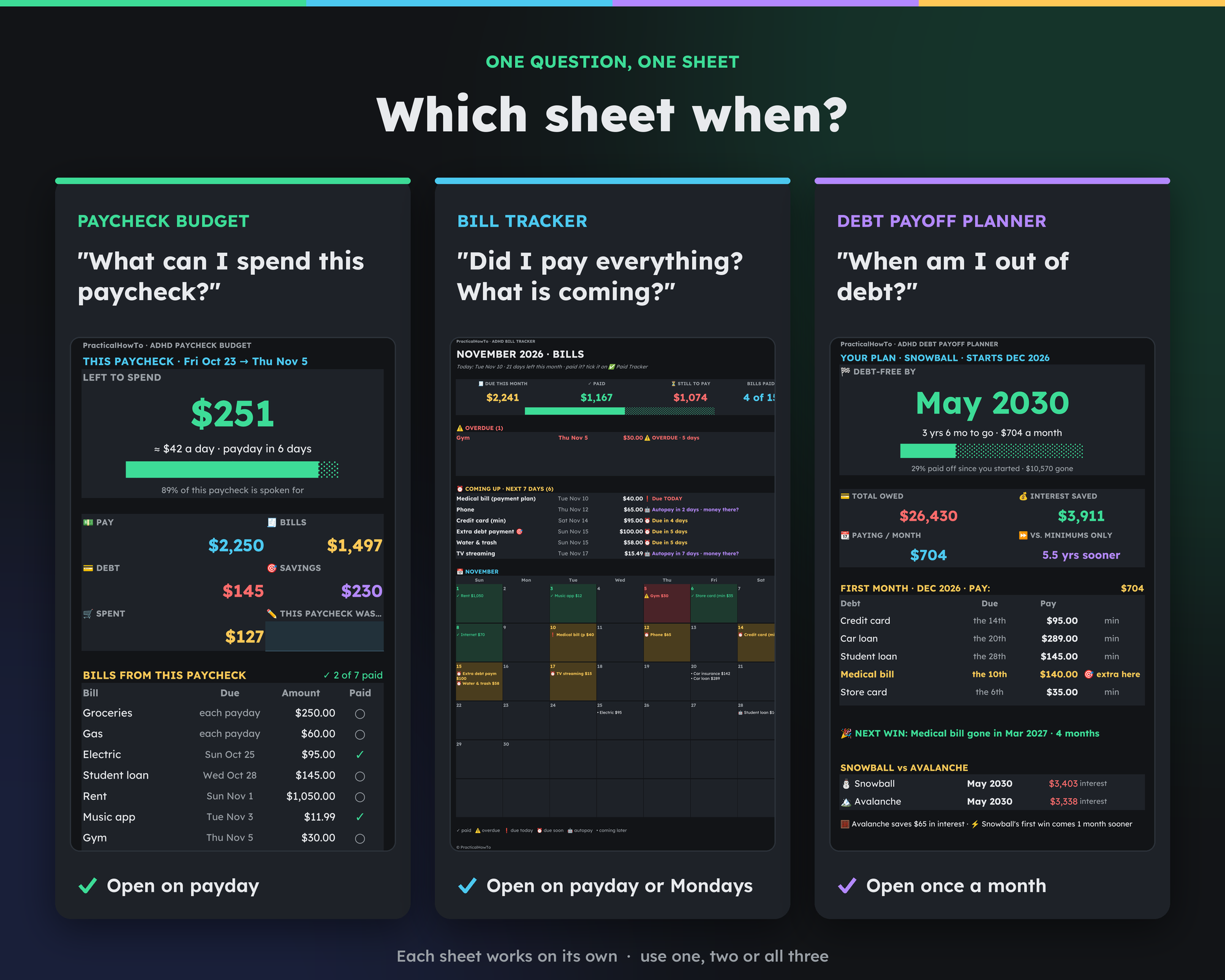
Three tools, one simple rhythm
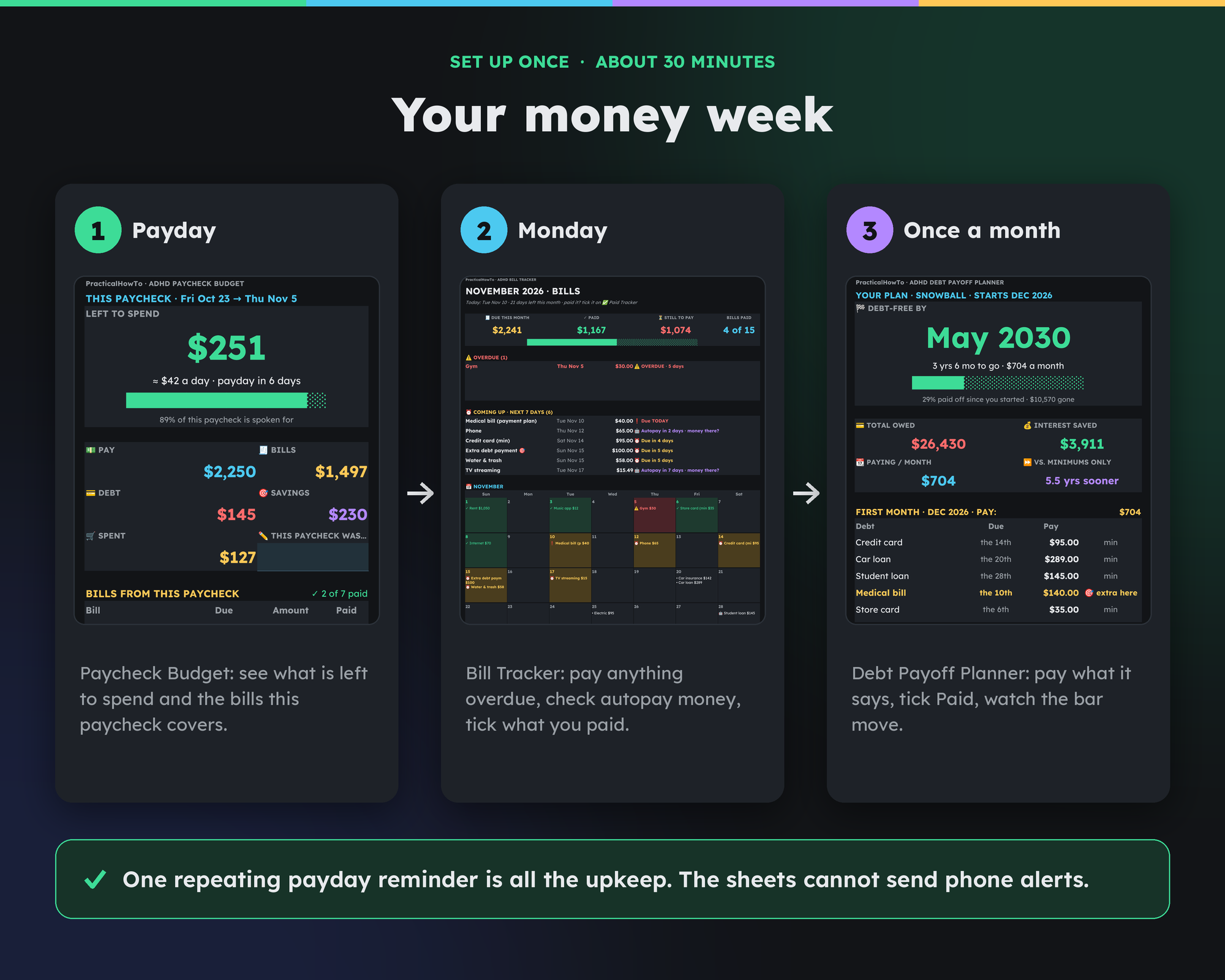
Each sheet answers one question, and each has its moment: open the Paycheck Budget on payday, glance at the Bill Tracker on Mondays, check the Debt Payoff Planner once a month. Together they cover spending, bills, and debt without any single screen trying to do everything.
Each sheet also works on its own — start with whichever answers your most stressful question.
What the included example shows
Every copy comes with a pre-filled example profile so you can watch the system work before touching your own numbers. These are that example's figures — formula-checked, and labeled as an example because your numbers will be your own.
$26,430 owed
Total debt on the example profile, across 5 debts.
May 2030 vs Nov 2035
Debt-free date: snowball plan vs minimum payments only.
$3,911 interest saved
Example savings vs paying minimums, at $704 a month.
$2,241 due this month
Example bills for one month — $27,102 across a full year.
Set up once · about 30 minutes
How it works
1
Buy it on Etsy
It's an instant download — no shipping, nothing physical. Your files are ready right after checkout.
2
Open the Start Here guide
The PDF guide has the copy links for all three tools — Example and Blank of each — plus the setup order.
3
Make your copies, add your numbers
Click a link, choose “Make a copy,” and type your numbers into the blue cells. Set one repeating payday phone reminder to open your sheets — that's the whole upkeep.
One repeating payday reminder is all the upkeep — the sheets themselves can't send phone alerts, and this page won't pretend otherwise.
The bundle
What's inside
ADHD Paycheck Budget
“What can I spend this paycheck?” Left-to-spend and per-day numbers, bills split by paycheck, next-3-paychecks preview, spending log, savings goals. 7 tabs.
$12.99
sold separately
ADHD Bill Tracker
“Did I pay everything? What's coming?” One-screen bill list and calendar, overdue and autopay alerts, 12-month paid grid, year view with heavy-month warnings. 5 tabs.
$8.99
sold separately
ADHD Debt Payoff Planner
“When am I out of debt?” Snowball vs avalanche side by side, your debt-free date, interest saved, payoff calendar with milestones. 6 tabs.
$9.99
sold separately
Start Here guide (PDF)
All 6 copy links (Example + Blank for each sheet), a “which sheet when” page, your money week, tips, and FAQ.
Included
with the bundle
Get all three as one system
All three separately$31.97
The complete system$24.95
You save$7.02
$24.95
Launch sale pricing — 50% off through November 30, 2026
Instant download · One-time payment · Works in free Google Sheets · Yours to keep
Straight answers
Questions, honestly answered
What do I need to use it?+
A free Google account — that's it. The system runs in Google Sheets, which is free. No software to buy, no app subscription, nothing to install on a computer.
How do I get it after I buy?+
It's an instant digital download. After checkout you download the Start Here guide PDF, click the link for each sheet, and choose “Make a copy.” Your own private copies land in your Google Drive — the Example and Blank version of each of the three tools, 6 copies in all.
Does it work on my phone?+
Yes — in the free Google Sheets app on phone or tablet, or in any web browser on a computer. The dashboards were designed phone-first: big numbers, dark background, one question per screen.
Will it remind me when a bill is due?+
Honestly: no spreadsheet can send you a notification, and this one won't pretend to. Overdue and due-soon bills sit at the top of the Bill Tracker the moment you open it. The system asks for exactly one habit — a repeating phone or calendar reminder on payday that says “open my money sheets.” That single reminder covers everything.
Does it connect to my bank?+
No. Nothing syncs and no bank login is ever asked for. You type your bills, balances, and paychecks into the blue cells, and the sheets do the math. It takes a few minutes on payday — and your financial logins stay yours.
Is this financial advice?+
No. These are planning spreadsheets: they organize your numbers and show you dates and totals based on what you type. Debt interest is estimated monthly, so real statements can differ slightly. For advice about your specific situation, talk to a qualified financial professional.
Your next payday could feel different
Not “new year, new you.” Just: money lands, you open one sheet, and you know what you can spend, what's covered, and when the debt ends.